How To Create A Post In WordPress Step By Step Guide
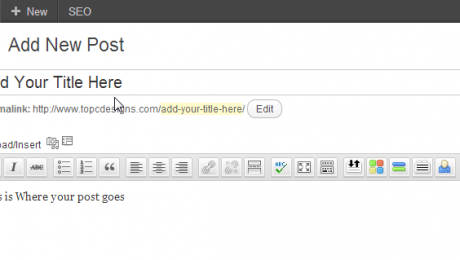
Creating your first WordPress Blog Post can be a bit intimidating, but with a little knowledge on what each button does soon you will be an old pro at blogging. WordPress has an amazing set of features to give you the ability to publish great blog posts with relative ease. Here is a basic tutorial to help you get started.
Step 1. Log Into your WordPress Blog

Go to your website and add /wp-login.php this will bring you to your WordPress log in page.

Step 2. Run Your Mouse Over Post Then Click Add New

Step 3. Creating Your Blog Post
You will now be able to create your blog post. There are several buttons that will help you with creating your blog post. Please see some examples below.

Show/Hide Kitchen Sink Button -If you don’t see all of your tabs simple click the hide/show kitchen sink. This will expand the menu and show you all your button options.

Word Button – If you have created your blog post in Microsoft Word and want to past from word, there is a button for that as well. Click the button ad past your blog post into the form and it will then past it into your Editor.

HTML Tab – If you have created your post in HTML and would like to enter the HTML code click on the HTML Tab beside the Visual Tab.

Add Image – To add an image to your post click the Add Media button and select upload. You can add images from your computer or copy and past a URL from the internet.

Formatting Button – To add H2 Tags or other formatting buttons, highlight with your mouse what you would like to format and then click the Paragraph drop down menu and select the type of formatting you want to use.

Step 4. Selecting Category
On the left hand side of your editor you will see Categories WordPress allow you to create as many categories as you like. To Create a new category click on Add New Category right blow the categories list.

Step 5. Adding Tags
What are Tags? Tags provide a useful way to group related posts together and to quickly tell readers what a post is about. Tags also make it easier for people to find your content. Tags are similar to, but more specific than, categories. On your left hand side of your page under Categories you will see the Tags. Fill out your tag one by one or separate each tag with a coma and then click add.


Step 6. Preview Blog Post
Once you are completed your blog and are happy with it, you can preview what you blog post looks like before you save it as a draft to continue to work on it or publish it. To Preview your blog post click on the preview button under Publish.

Step 7 – Save As A Draft Or Publish Your Blog Post
It is now time to save your blog post as a draft and work on it later or publish your blog post. The beauty of WordPress is that you can edit your blog post at anytime and WordPress will also save a history of all your blog post edits. To Save as a draft click Save Draft under the Publish Menu. To Publish your post click the Publish Button under the Publish Menu.


Step 8. Preview Your Post
After you have published your blog you will see in yellow highlight above your post where it says Post Published. Click the Link To View your post. Remember every time you make changes to your blog post make sure you click the update button Under the Publish Menu.

- Published in News
Create a Great Blog Post
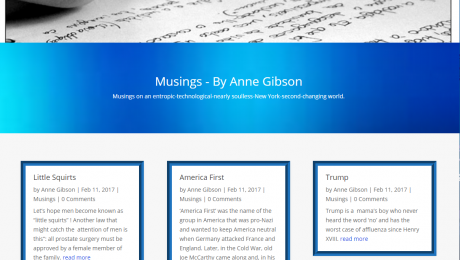
Are there tricks and secrets about how to create a great blog post? The answer is yes! There are many things you can do to increase your reading audience and create a great content rich blog post.
A Good Title Is Key:
Your title should include what your content is about. Think about what you yourself would type into a search engine when searching for information on your subject. You tile is going to be the first thing potential readers are going to see. Make sure to make it easy to read and not complicated. Keywords are also important in a title. You keywords will allow search engines to pick up your content easily, as well as be a great attention grabber.
First Line Should Grab Attention:
The first line of your blog post is where you want to draw your audience in. There are several ways you can do this.
- Ask a question, and then provide the answer to your question. People often will search the internet for advice or answers.
- Share a story or an analogy about your subject.
- Make your subject controversial get your readers revved up.
No Guts No Glory:
When you are writing your content, keep it simple; do not stuff your blog that the everyday Joe is not going to read. You do not want to bore or put your audience to sleep. Don’t make your blog post too long, on average anywhere between 300-500 words are great. Keep your flow of your blog smooth and easy, don’t do too much keyword stuffing. Be interesting; you want them coming back for more. Add a photo to your blog post. Make sure you proofread your blog post for any spelling mistakes. Open up the discussion and get readers involved by allowing comments. Last but not least promote your Blog, use your social networking to better increase your audience.
- Published in News
Bowling Centre Brockville
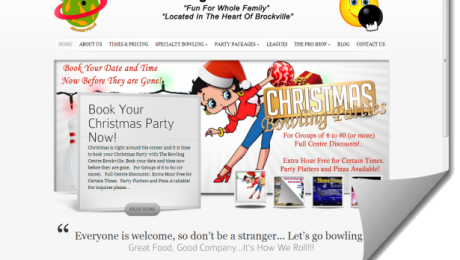
The Bowling Centre is a family run business geared towards family oriented fun and physical recreation that recently took an exciting step to the main stage with combining an entertainment aspect and fitness among friends with the introduction of Cosmic Karaoke on Friday and Saturday nights.
[testimonial company=”Bowling Centre Brockville” author=”Stan Smith” image=”https://ste.ctp.mybluehost.me/site/wp-content/uploads/2013/03/logo2test.png”] I can’t say enough about the fantastic job Top C Designs did on my website. It is colorful, eye catching, extremely well laid out and well beyond my expectations. On top of that is was very reasonably priced. I would have no hesitation in recommending Top C Designs as the company to create and manage your website. Check mine out for yourself at www.bowlingbrockville.com.
[/testimonial]

- Published in Featured
Komodo Gear Wesbite
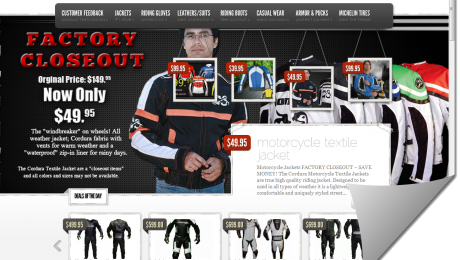
Komodo Gear, the manufacturer and distributor of the Komodo brand of motorcycle leather and apparel, was founded in 2004 by Lee and Wayne.
The creation of Komodo was born out of necessity; to provide better products and services direct to riders. Komodo is focused on providing world class safety apparel for road racing, drag racing, track days and street riders. Komodo Gear is also a virtual distributor for other manufacturers who choose to be “Defiantly Different”. Providing customers with personal attention and high quality products direct from the manufacturer is our commitment to the motorcycle community.

[testimonial company=”Komodo Gear” author=”Wayne Wilder” image=”https://ste.ctp.mybluehost.me/site/wp-content/uploads/2013/03/wp-logo.png”] When we started with Top C Designs, our on-line presence and social strategy barely existed; today, we have sold our products to over 20 countries on 6 different continents all on-line. Top C Design made a huge impact on our on-line business. They took the time to understand our business and then assigned a dedicated team to deliver our brand with technologies & services that actually work. This saved us a lot of time and unnecessary expense. That is the different Top C Design brings to business owners.
[/testimonial]
- Published in Featured